Keys and Certificates
This chapter covers the key and certificate formats wolfSSL supports, how certificates and keys are loaded and verified, and how to generate keys, certificates and certificate signing requests.
Supported Formats and Sizes
wolfSSL (formerly CyaSSL) has support for PEM, and DER formats for certificates and keys, as well as PKCS#8 private keys (with PKCS#5 or PKCS#12 encryption).
PEM, or "Privacy Enhanced Mail" is the most common format that certificates are issued in by certificate authorities. PEM files are Base64 encoded ASCII files which can include multiple server certificates, intermediate certificates, and private keys, and usually have a .pem, .crt, .cer, or .key file extension. Certificates inside PEM files are wrapped in the "-----BEGIN CERTIFICATE-----" and "-----END CERTIFICATE-----" statements.
DER, or "Distinguished Encoding Rules", is a binary format of a certificate. DER file extensions can include .der and .cer, and cannot be viewed with a text editor.
An X.509 certificate is encoded using ASN.1 format. The DER format is the ASN.1 encoding. The PEM format is Base64 encoded and wrapped with a human readable header and footer. TLS sends certificates in DER format.
PKCS #12, also called PFX, is a password-protected bundle that carries a private key together with its certificate and CA chain in a single file, usually with a .p12 or .pfx extension. wolfSSL can read and write these bundles through the wolfCrypt PKCS #12 API; see PKCS #12 for details.
Supported Certificate Extensions
If an unsupported or unknown extension that is marked as critical is found, then
an error message is returned, otherwise unsupported or unknown extensions found
are ignored. Most extensions are parsed in a default build. --enable-certext
(macro WOLFSSL_CERT_EXT), or WOLFSSL_SEP, is only needed to parse the
Certificate Policies extension and to generate extensions. This is a high level
list of certificate extensions that can be parsed and at least part, if not
all, of the extensions can be used.
| Extension From RFC 5280 | Supported |
|---|---|
| Authority Key Identifier | Yes |
| Subject Key Identifier | Yes |
| Key Usage | Yes |
| Certificate Policies | Yes (requires WOLFSSL_CERT_EXT or WOLFSSL_SEP) |
| Policy Mappings | No |
| Subject Alternative Name | Yes |
| Issuer Alternative Name | No |
| Subject Directory Attributes | Yes (with WOLFSSL_SUBJ_DIR_ATTR) |
| Basic Constraints | Yes |
| Name Constraints | Yes |
| Policy Constraints | Partial (parsed; rejected when critical unless WOLFSSL_NO_ASN_STRICT) |
| Extended Key Usage | Yes |
| CRL Distribution Points | Yes |
| Inhibit anyPolicy | Partial (not enforced; rejected when critical unless WOLFSSL_NO_ASN_STRICT) |
| Freshest CRL | No |
| Authority Information Access | Yes (rejected when critical unless WOLFSSL_ALLOW_CRIT_AIA) |
| Subject Information Access | Yes (with WOLFSSL_SUBJ_INFO_ACC) |
| Additional Extension | Supported |
|---|---|
| Netscape | Yes |
| Custom OID | Yes |
| OCSP No Check | Yes (with HAVE_OCSP) |
| Alternative public key and signature (SubjectAltPublicKeyInfo, AltSignatureAlgorithm, AltSignatureValue) | Yes (with WOLFSSL_DUAL_ALG_CERTS) |
| ACME identifier | Yes (with WOLFSSL_ACME_OID) |
The next couple of sections delve deeper into the support of the individual certificate extensions.
Auth/Subject Key ID
By default key IDs are a SHA-1 hash of the key. SHA256 hashes of the key are also supported.
Subject Alternative Names
| Alternative Name Types | Supported |
|---|---|
| Yes | |
| DNS name | Yes |
| IP address | Yes |
| URI | Yes |
| directory name | Yes |
| registered ID | Yes |
| other name | Yes (values decoded with WOLFSSL_SEP or WOLFSSL_FPKI: UPN, plus FASC-N with WOLFSSL_FPKI and hardware module name with WOLFSSL_SEP) |
Key Usage
Key usage can be parsed and retrieved after parsing of the certificate is complete.
| Key Usage | Supported |
|---|---|
| digitalSignature | Yes |
| nonRepudiation | Yes |
| keyEncipherment | Yes |
| dataEncipherment | Yes |
| keyAgreement | Yes |
| keyCertSign | Yes |
| cRLSign | Yes |
| encipherOnly | Yes |
| decipherOnly | Yes |
Extended Key Usage
Starting at wolfSSL version 3.15.5 if an extended key usage is unknown/unsupported then it is ignored. For versions before 3.15.5 an unknown extended key usage OID will cause a parsing error.
| Extended Key Usage | Supported |
|---|---|
| anyExtendedKeyUsage | Yes |
| id-kp-serverAuth | Yes |
| id-kp-clientAuth | Yes |
| id-kp-codeSigning | Yes |
| id-kp-emailProtection | Yes |
| id-kp-timeStamping | Yes |
| id-kp-OCSPSigning | Yes |
Custom OID Extensions
Custom OID X.509 extension injection and parsing was introduced in wolfSSL
version 5.3.0. To set a custom extension in a Cert struct with
wc_SetCustomExtension(), the enable options --enable-certgen and
--enable-certext (WOLFSSL_CERT_EXT) must be used along with the macros
WOLFSSL_CUSTOM_OID and HAVE_OID_ENCODING. The ASN.1 template code
(WOLFSSL_ASN_TEMPLATE) is also required. It is the default for all builds,
including WOLFSSL_USER_SETTINGS builds, unless WOLFSSL_ASN_ORIGINAL is
defined.
To handle unknown extension OIDs when parsing a DecodedCert struct, register
a callback with wc_SetUnknownExtCallback(). This needs
WC_ASN_UNKNOWN_EXT_CB, which is enabled automatically when
WOLFSSL_CUSTOM_OID, HAVE_OID_DECODING and the ASN.1 template code are all
enabled. For certificates received in a TLS connection, register the callback
on the certificate manager with wolfSSL_CertManagerSetUnknownExtCallback().
These callbacks receive the OID as an array of word16 arcs, which truncates
arcs larger than 65535, so prefer the word32 variants
wc_SetUnknownExtCallback32(), wc_SetUnknownExtCallback32Ex() and
wolfSSL_CertManagerSetUnknownExtCallback32(). The ...Ex variants also pass
a user context to the callback.
The configure option --enable-asn=all (WOLFSSL_ASN_ALL) turns on
WOLFSSL_CERT_EXT, WOLFSSL_CUSTOM_OID, HAVE_OID_ENCODING and
HAVE_OID_DECODING.
Strict DER Parsing
wolfSSL 5.9.4 rejects a certificate that carries trailing bytes after the DER structure, and only the certificate itself is copied into a WOLFSSL_X509. Define WOLFSSL_NO_ASN_STRICT to accept such certificates. The parser also rejects certificates with critical policyConstraints or inhibitAnyPolicy extensions, empty certificatePolicies, trailing bytes after the last PolicyInformation, or duplicate Netscape certificate type extensions. Extended Key Usage is enforced on every CA the peer transmits in its chain, not only on the leaf: a chain CA that does not carry the purpose in use fails the handshake with EXTKEYUSE_AUTH_E. A chain certificate that matches a loaded trust anchor (same subject and same public key) is exempt, as RFC 5280 keeps the anchor outside the certification path; a self-issued certificate with a different key, such as a key rollover certificate, is still checked. An absent extension and anyExtendedKeyUsage leave all purposes valid, and IGNORE_KEY_EXTENSIONS opts out.
Certificate Loading
Certificates are normally loaded using the file system (although loading from memory buffers is supported as well - see No File System and using Certificates).
Loading CA Certificates
CA certificate files can be loaded using the wolfSSL_CTX_load_verify_locations() function:
int wolfSSL_CTX_load_verify_locations(WOLFSSL_CTX *ctx,
                                      const char *CAfile,
                                      const char *CApath);
CA loading can also parse multiple CA certificates per file using the above function by passing in a CAfile in PEM format with as many certs as possible. This makes initialization easier, and is useful when a client needs to load several root CAs at startup. This makes wolfSSL easier to port into tools that expect to be able to use a single file for CAs.
NOTE: If you have to load a chain of Roots and Intermediate certificates you must load them in the order of trust. Load ROOT CA first followed by Intermediate 1 followed by Intermediate 2 and so on. You may call wolfSSL_CTX_load_verify_locations() for each cert to be loaded or just once with a file containing the certs in order (Root at the top of the file and certs ordered by the chain of trust)
Loading Client or Server Certificates
Loading single client or server certificates can be done with the wolfSSL_CTX_use_certificate_file() function. If this function is used with a certificate chain, only the actual, or "bottom" certificate will be sent.
int wolfSSL_CTX_use_certificate_file(WOLFSSL_CTX* ctx,
                                     const char* file,
                                     int format);
file is the client or server (entity) certificate file, and format is its encoding, WOLFSSL_FILETYPE_PEM or WOLFSSL_FILETYPE_ASN1.
The server and client can send certificate chains using the wolfSSL_CTX_use_certificate_chain_file() function. The certificate chain file must be in PEM format and must be sorted starting with the subject's certificate (the actual client or server cert), followed by any intermediate certificates and ending (optionally) at the root "top" CA. The example server (/examples/server/server.c) uses this functionality.
NOTE: This is the exact reverse of the order necessary when loading a certificate chain for verification! Your file contents in this scenario would be Entity cert at the top of the file followed by the next cert up the chain and so on with Root CA at the bottom of the file.
int wolfSSL_CTX_use_certificate_chain_file(WOLFSSL_CTX *ctx,
                                 const char *file);
Loading Private Keys
Server private keys can be loaded using the wolfSSL_CTX_use_PrivateKey_file() function.
int wolfSSL_CTX_use_PrivateKey_file(WOLFSSL_CTX *ctx,
                      const char *keyFile, int type);
keyFile is the private key file, and type is the format of the private key (e.g. WOLFSSL_FILETYPE_PEM).
Loading Encrypted Private Keys
Password-protected (encrypted) PEM and PKCS #8 private keys can be loaded with the same functions when wolfSSL is built with WOLFSSL_ENCRYPTED_KEYS (--enable-enckeys, also enabled by --enable-opensslextra). Register a password callback before loading the key with wolfSSL_CTX_set_default_passwd_cb(), and optionally pass it user data with wolfSSL_CTX_set_default_passwd_cb_userdata():
int myPasswordCb(char* passwd, int sz, int rw, void* userdata)
{
    const char* pass = "my-key-password";
    int len = (int)strlen(pass);

    (void)rw;
    (void)userdata;
    if (len > sz)
        return -1;
    memcpy(passwd, pass, len);
    return len; /* length of the password */
}

wolfSSL_CTX_set_default_passwd_cb(ctx, myPasswordCb);
ret = wolfSSL_CTX_use_PrivateKey_file(ctx, "./server-key-enc.pem",
                                      WOLFSSL_FILETYPE_PEM);
The cipher used to encrypt the key must be enabled in the build. For example, the encrypted test keys in the wolfSSL certs directory use DES or 3DES, which are disabled by default.
Loading Trusted Peer Certificates
Loading a trusted peer certificate to use can be done with wolfSSL_CTX_trust_peer_cert().
int wolfSSL_CTX_trust_peer_cert(WOLFSSL_CTX *ctx,
                 const char *trustCert, int type);
trustCert is the certificate file to load, and type is the format of the certificate (i.e. WOLFSSL_FILETYPE_PEM). Trusted peer certificates require wolfSSL to be built with WOLFSSL_TRUST_PEER_CERT defined. There is no dedicated configure option for it, so add it through CFLAGS (for example ./configure CFLAGS="-DWOLFSSL_TRUST_PEER_CERT").
Loading System CA Certificates
The CA certificates trusted by the operating system can be loaded with wolfSSL_CTX_load_system_CA_certs(), which is available when wolfSSL is built with --enable-sys-ca-certs (enabled by default).
int wolfSSL_CTX_load_system_CA_certs(WOLFSSL_CTX* ctx);
Converting PEM to DER
To convert PEM data in memory to DER, wolfCrypt provides wc_KeyPemToDer() for private keys (with an optional password for encrypted keys), wc_CertPemToDer() for certificates, and the more general wc_PemToDer(), which takes the PEM type and returns a DerBuffer. They are declared in wolfssl/wolfcrypt/asn_public.h:
int wc_KeyPemToDer(const unsigned char* pem, int pemSz,
                   unsigned char* buff, int buffSz, const char* pass);
int wc_CertPemToDer(const unsigned char* pem, int pemSz,
                    unsigned char* buff, int buffSz, int type);
Certificate Chain Verification
wolfSSL requires only the top or "root" certificate in a chain to be loaded as a trusted certificate in order to verify a certificate chain. This means that if you have a certificate chain (A -> B -> C), where C is signed by B, and B is signed by A, wolfSSL only requires that certificate A be loaded as a trusted certificate in order to verify the entire chain (A->B->C).
For example, if a server certificate chain looks like:
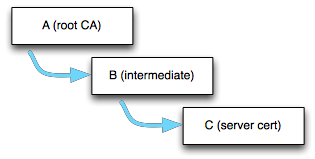
The wolfSSL client should already have at least the root cert (A) loaded as a trusted root (with wolfSSL_CTX_load_verify_locations()). When the client receives the server cert chain, it uses the signature of A to verify B, and if B has not been previously loaded into wolfSSL as a trusted root, B gets stored in wolfSSL's internal cert chain (wolfSSL just stores what is necessary to verify a certificate: common name hash, public key and key type, etc.). If B is valid, then it is used to verify C.
Following this model, as long as root cert "A" has been loaded as a trusted root into the wolfSSL client, the server certificate chain will still be able to be verified if the server sends (A->B->C), or (B->C). If the server just sends (C), and not the intermediate certificate, the chain will not be able to be verified unless the wolfSSL client has already loaded B as a trusted root.
Domain Name Check for Server Certificates
wolfSSL has an extension on the client that automatically checks the domain of the server certificate. In OpenSSL mode nearly a dozen function calls are needed to perform this. wolfSSL checks that the date of the certificate is in range, verifies the signature, and additionally verifies the domain if you call wolfSSL_check_domain_name(WOLFSSL* ssl, const char* dn) before calling wolfSSL_connect(). wolfSSL matches dn (the expected domain name) against the subjectAltName DNS entries of the peer's server certificate. It falls back to the subject Common Name only when the certificate has no subjectAltName DNS entry. If the names match wolfSSL_connect() will proceed normally, however if there is a name mismatch, wolfSSL_connect() will return a fatal error and wolfSSL_get_error() will return DOMAIN_NAME_MISMATCH.
Checking the domain name of the certificate is an important step that verifies the server is actually who it claims to be. This extension is intended to ease the burden of performing the check.
No File System and using Certificates
Normally a file system is used to load private keys, certificates, and CAs. Since wolfSSL is sometimes used in environments without a full file system, an extension to use memory buffers instead is provided. The following functions are available in every build with certificate support (they do not depend on NO_FILESYSTEM), and are the only option when NO_FILESYSTEM is defined (wolfSSL_CTX_trust_peer_buffer() also needs WOLFSSL_TRUST_PEER_CERT):
int wolfSSL_CTX_load_verify_buffer(WOLFSSL_CTX* ctx, const unsigned char* in,long sz, int format);int wolfSSL_CTX_use_certificate_buffer(WOLFSSL_CTX* ctx, const unsigned char* in, long sz, int format);int wolfSSL_CTX_use_PrivateKey_buffer(WOLFSSL_CTX* ctx, const unsigned char* in, long sz, int format);int wolfSSL_CTX_use_certificate_chain_buffer(WOLFSSL_CTX* ctx, const unsigned char* in,long sz);int wolfSSL_CTX_trust_peer_buffer(WOLFSSL_CTX* ctx, const unsigned char* in, long sz, int format);
Use these functions exactly like their counterparts that are named *_file instead of *_buffer. And instead of providing a filename provide a memory buffer. See API documentation for usage details.
Test Certificate and Key Buffers
wolfSSL comes bundled with test certificate and key files. Additionally, it also comes bundled with test certificate and key buffers for use in environments with no filesystem available. These buffers are available in wolfssl/certs_test.h when defining one or more of USE_CERT_BUFFERS_1024, USE_CERT_BUFFERS_2048, USE_CERT_BUFFERS_3072, USE_CERT_BUFFERS_4096, USE_CERT_BUFFERS_256 or USE_CERT_BUFFERS_25519.
Serial Number Retrieval
The serial number of an X.509 certificate can be extracted from wolfSSL using wolfSSL_X509_get_serial_number(). The serial number can be of any length.
int wolfSSL_X509_get_serial_number(WOLFSSL_X509* x509,
            unsigned char* buffer, int* inOutSz)
buffer will be written to with at most *inOutSz bytes on input. After the call, if successful (return of 0), *inOutSz will hold the actual number of bytes written to buffer. A full example is included in wolfssl/test.h.
RSA Key Generation
wolfSSL supports RSA key generation of lengths from RSA_MIN_SIZE (2048 bits by default) up to RSA_MAX_SIZE, which depends on the math library configuration (SP_INT_BITS or FP_MAX_BITS). Key generation is off by default but can be turned on during the ./configure process with --enable-keygen or by defining WOLFSSL_KEY_GEN in Windows or non-standard environments. Creating a key is easy, only requiring one function from rsa.h:
int wc_MakeRsaKey(RsaKey* key, int size, long e, WC_RNG* rng);
Where size is the length in bits and e is the public exponent (using 65537 is usually a good choice for e). The following, based on wolfcrypt/test/test.c, gives an example creating an RSA key of 2048 bits:
RsaKey genKey;
WC_RNG rng;
int    ret;

ret = wc_InitRng(&rng);
if (ret != 0)
    /* ret contains error */;
ret = wc_InitRsaKey(&genKey, NULL);
if (ret != 0)
    /* ret contains error */;

ret = wc_MakeRsaKey(&genKey, 2048, 65537, &rng);
if (ret != 0)
    /* ret contains error */;
When they are no longer needed, free the key and RNG with wc_FreeRsaKey(&genKey) and wc_FreeRng(&rng).
The RsaKey genKey can now be used like any other RsaKey. If you need to export the key, wc_RsaKeyToDer() (declared in rsa.h) encodes it as DER, and wc_DerToPem() (declared in asn_public.h) converts DER to PEM. wc_DerToPem() needs WOLFSSL_DER_TO_PEM, which --enable-keygen, --enable-certgen and --enable-opensslextra enable automatically. Always convert the key to DER format first, and then if you need PEM use the generic wc_DerToPem() function like this:
byte der[4096];
int  derSz = wc_RsaKeyToDer(&genKey, der, sizeof(der));
if (derSz < 0)
    /* derSz contains error */;
The buffer der now holds a DER format of the key. To convert the DER buffer to PEM use the conversion function:
byte pem[4096];
int  pemSz = wc_DerToPem(der, derSz, pem, sizeof(pem),
                      PRIVATEKEY_TYPE);
if (pemSz < 0)
    /* pemSz contains error */;
The last argument of DerToPem() takes a type parameter, usually either PRIVATEKEY_TYPE or CERT_TYPE. Now the buffer pem holds the PEM format of the key. Supported types are listed below. Some are only available when the matching feature is compiled in (for example CERTREQ_TYPE needs WOLFSSL_CERT_REQ and ED448_TYPE needs HAVE_ED448):
CA_TYPETRUSTED_PEER_TYPECHAIN_CERT_TYPECERT_TYPETRUSTED_CERT_TYPECRL_TYPEDH_PARAM_TYPEX942_PARAM_TYPEDSA_PARAM_TYPECERTREQ_TYPEPKCS7_TYPEACERT_TYPEDSA_TYPEDSA_PRIVATEKEY_TYPEECC_TYPEECC_PRIVATEKEY_TYPEECC_PARAM_TYPERSA_TYPEPRIVATEKEY_TYPEED25519_TYPEED448_TYPEEDDSA_PRIVATEKEY_TYPEFALCON_LEVEL1_TYPE,FALCON_LEVEL5_TYPEML_DSA_44_TYPE,ML_DSA_65_TYPE,ML_DSA_87_TYPESLH_DSA_SHAKE_128F_TYPE,SLH_DSA_SHAKE_192F_TYPE,SLH_DSA_SHAKE_256F_TYPE,SLH_DSA_SHAKE_128S_TYPE,SLH_DSA_SHAKE_192S_TYPE,SLH_DSA_SHAKE_256S_TYPEand the matchingSLH_DSA_SHA2_*_TYPEvaluesPUBLICKEY_TYPEECC_PUBLICKEY_TYPERSA_PUBLICKEY_TYPEDH_PRIVATEKEY_TYPEPKCS8_PRIVATEKEY_TYPEPKCS8_ENC_PRIVATEKEY_TYPE
RSA Key Generation Notes
The RSA private key contains the public key as well. The private key can be used as both a private and public key by wolfSSL as used in test.c. The private key and the public key (in the form of a certificate) is all that is typically needed for SSL.
A separate public key can be loaded into wolfSSL manually using the wc_RsaPublicKeyDecode() function if need be. Additionally, the wc_RsaKeyToPublicDer() function can be used to export the public RSA key.
ECC and Ed25519 Key Generation
ECC keys are generated with wc_ecc_make_key() from ecc.h, where the key size is given in bytes (32 for the default P-256 curve). wc_ecc_make_key_ex() also takes a curve ID. Ed25519 keys (--enable-ed25519) are generated with wc_ed25519_make_key() from ed25519.h, where the key size must be ED25519_KEY_SIZE (32). Using the rng from the RSA example above:
ecc_key     eccKey;
ed25519_key edKey;

ret = wc_ecc_init(&eccKey);
if (ret == 0)
    ret = wc_ecc_make_key(&rng, 32, &eccKey);
if (ret != 0)
    /* ret contains error */;

ret = wc_ed25519_init(&edKey);
if (ret == 0)
    ret = wc_ed25519_make_key(&rng, ED25519_KEY_SIZE, &edKey);
if (ret != 0)
    /* ret contains error */;
Free the keys with wc_ecc_free() and wc_ed25519_free() when done. wc_EccKeyToDer() (see Exporting an ECC Key to DER) and wc_Ed25519KeyToDer() export them in DER format.
Certificate Generation
wolfSSL supports X.509 v3 certificate generation. Certificate generation is off by default but can be turned on during the ./configure process with --enable-certgen or by defining WOLFSSL_CERT_GEN in Windows or non-standard environments.
Before a certificate can be generated the user needs to provide information about the subject of the certificate. This information is contained in a structure from wolfssl/wolfcrypt/asn_public.h named Cert:
/* for user to fill for certificate generation */
typedef struct Cert {
    int      version;                   /* x509 version  */
    byte     serial[CTC_SERIAL_SIZE];   /* serial number */
    int      serialSz;                  /* serial size */
    int      sigType;                   /* signature algo type */
    CertName issuer;                    /* issuer info */
    CertName subject;                   /* subject info */
    int      daysValid;                 /* validity days */
    int      selfSigned;                /* self signed flag */
    int      isCA;                      /* is this going to be a CA */
    byte     pathLen;                   /* max depth of valid certification
                                         * paths that include this cert */
    ...
} Cert;
Where CertName looks like this (excerpt; see asn_public.h for the full definition):
typedef struct CertName {
    char country[CTC_NAME_SIZE];
    char countryEnc;
    char state[CTC_NAME_SIZE];
    char stateEnc;
    char street[CTC_NAME_SIZE];
    char streetEnc;
    char locality[CTC_NAME_SIZE];
    char localityEnc;
    char sur[CTC_NAME_SIZE];
    char surEnc;
    ...
    char org[CTC_NAME_SIZE];
    char orgEnc;
    char unit[CTC_NAME_SIZE];
    char unitEnc;
    char commonName[CTC_NAME_SIZE];
    char commonNameEnc;
    char serialDev[CTC_NAME_SIZE];
    char serialDevEnc;
    char userId[CTC_NAME_SIZE];
    char userIdEnc;
    char postalCode[CTC_NAME_SIZE];
    char postalCodeEnc;
    ...
    char email[CTC_NAME_SIZE];  /* !!!! email has to be last !!!! */
    ...
} CertName;
With WOLFSSL_CERT_NAME_ALL the structure also has givenName, initials, dnQualifier and dnName fields, and with WOLFSSL_CERT_EXT it has busCat, joiC and joiSt fields. These come before email. After email come name[] (with WOLFSSL_MULTI_ATTRIB) and custom (with WOLFSSL_CUSTOM_OID).
Before filling in the subject information an initialization function needs to be called like this:
Cert myCert;
wc_InitCert(&myCert);
wc_InitCert() sets defaults for some of the variables including setting the version to 3 (0x02), the serial number to 0 (randomly generated), the sigType to CTC_SHA256wRSA (falling back to SHA-384, SHA-512, SHA-224 or SHA-1 with RSA if SHA-256 is disabled), the daysValid to 500, and selfSigned to 1 (TRUE). Supported signature types include the following, each available when the matching algorithm is compiled in:
CTC_SHAwDSA,CTC_SHA256wDSACTC_MD2wRSACTC_MD5wRSACTC_SHAwRSACTC_SHAwECDSACTC_SHA224wRSACTC_SHA224wECDSACTC_SHA256wRSACTC_SHA256wECDSACTC_SHA384wRSACTC_SHA384wECDSACTC_SHA512wRSACTC_SHA512wECDSACTC_SHA3_224wRSA,CTC_SHA3_256wRSA,CTC_SHA3_384wRSA,CTC_SHA3_512wRSACTC_SHA3_224wECDSA,CTC_SHA3_256wECDSA,CTC_SHA3_384wECDSA,CTC_SHA3_512wECDSACTC_RSASSAPSSCTC_ED25519CTC_ED448CTC_ML_DSA_44,CTC_ML_DSA_65,CTC_ML_DSA_87CTC_SLH_DSA_SHAKE_128F,CTC_SLH_DSA_SHAKE_192F,CTC_SLH_DSA_SHAKE_256F,CTC_SLH_DSA_SHAKE_128S,CTC_SLH_DSA_SHAKE_192S,CTC_SLH_DSA_SHAKE_256Sand the matchingCTC_SLH_DSA_SHA2_*valuesCTC_FALCON_LEVEL1,CTC_FALCON_LEVEL5CTC_HSS_LMSCTC_XMSS,CTC_XMSSMTCTC_SM3wSM2
Now the user can initialize the subject information like this example from wolfcrypt/test/test.c:
strncpy(myCert.subject.country, "US", CTC_NAME_SIZE);
strncpy(myCert.subject.state, "OR", CTC_NAME_SIZE);
strncpy(myCert.subject.locality, "Portland", CTC_NAME_SIZE);
strncpy(myCert.subject.org, "yaSSL", CTC_NAME_SIZE);
strncpy(myCert.subject.unit, "Development", CTC_NAME_SIZE);
strncpy(myCert.subject.commonName, "www.wolfssl.com", CTC_NAME_SIZE);
strncpy(myCert.subject.email, "facts@wolfssl.com", CTC_NAME_SIZE);
Then, a self-signed certificate can be generated using the variables genKey and rng from the above key generation example (of course any valid RsaKey or RNG can be used):
byte derCert[4096];

int certSz = wc_MakeSelfCert(&myCert, derCert, sizeof(derCert), &genKey, &rng);
if (certSz < 0)
  /* certSz contains the error */;
The buffer derCert now contains a DER format of the certificate. If you need a PEM format of the certificate you can use the generic wc_DerToPem() function and specify the type to be CERT_TYPE like this:
byte pemCert[4096];

int pemCertSz = wc_DerToPem(derCert, certSz, pemCert, sizeof(pemCert), CERT_TYPE);
if (pemCertSz < 0)
  /* pemCertSz contains error */;
The supported types are listed in RSA Key Generation above.
Now the buffer pemCert holds the PEM format of the certificate.
If you wish to create a CA signed certificate then a couple of steps are required. After filling in the subject information as before, you'll need to set the issuer information from the CA certificate. This can be done with wc_SetIssuer(), which reads the CA certificate from a PEM file (so it needs filesystem support), like this:
ret = wc_SetIssuer(&myCert, "./certs/ca-cert.pem");
if (ret < 0)
    /* ret contains error */;
Without a filesystem, use wc_SetIssuerBuffer(), which takes the CA certificate as a DER buffer.
Then you'll need to perform the two-step process of creating the certificate and then signing it (wc_MakeSelfCert() does these both in one step). You'll need the private keys from both the issuer (caKey) and the subject (key). Please see the example in test.c for complete usage.
byte derCert[4096];

int certSz = wc_MakeCert(&myCert, derCert, sizeof(derCert), &key, NULL, &rng);
if (certSz < 0)
   /*certSz contains the error*/;

certSz = wc_SignCert(myCert.bodySz, myCert.sigType, derCert,
            sizeof(derCert), &caKey, NULL, &rng);
if (certSz < 0)
   /*certSz contains the error*/;
The buffer derCert now contains a DER format of the CA signed certificate, and certSz, the return value of wc_SignCert(), is its total size. If you need a PEM format of the certificate please see the self signed example above. Note that wc_MakeCert() and wc_SignCert() provide function parameters for either an RSA or ECC key to be used. The above example uses an RSA key and passes NULL for the ECC key parameter. For other key types, wc_MakeCert_ex(), wc_SignCert_ex() and wc_MakeCertReq_ex() take a keyType (for example RSA_TYPE, ECC_TYPE, ED25519_TYPE, ED448_TYPE, ML_DSA_65_TYPE or one of the SLH-DSA types) and a void* key.
Certificate Signing Request (CSR) Generation
wolfSSL supports X.509 v3 certificate signing request (CSR) generation. CSR generation is off by default but can be turned on during the ./configure process with --enable-certreq --enable-certgen or by defining WOLFSSL_CERT_GEN and WOLFSSL_CERT_REQ in Windows or non-standard environments.
Before a CSR can be generated the user needs to provide information about the subject of the certificate. This information is contained in a structure from wolfssl/wolfcrypt/asn_public.h named Cert:
For details on the Cert and CertName structures please reference Certificate Generation above.
Before filling in the subject information an initialization function needs to be called like this:
Cert req;
wc_InitCert(&req);
req.version = 0; /* PKCS #10 CSRs are version 0 */
wc_InitCert() sets the same defaults as described in Certificate Generation above, and the same signature types are supported. Its default version of 2 is the X.509 v3 certificate version; a CSR must be version 0 (PKCS #10, RFC 2986), and wc_MakeCertReq() encodes the version field as set, so set it to 0 as shown.
Now the user can initialize the subject information like this example from https://github.com/wolfSSL/wolfssl-examples/blob/master/certgen/csr_example.c:
strncpy(req.subject.country, "US", CTC_NAME_SIZE);
strncpy(req.subject.state, "OR", CTC_NAME_SIZE);
strncpy(req.subject.locality, "Portland", CTC_NAME_SIZE);
strncpy(req.subject.org, "wolfSSL", CTC_NAME_SIZE);
strncpy(req.subject.unit, "Development", CTC_NAME_SIZE);
strncpy(req.subject.commonName, "www.wolfssl.com", CTC_NAME_SIZE);
strncpy(req.subject.email, "facts@wolfssl.com", CTC_NAME_SIZE);
Then, a CSR can be generated. This example uses an ECC key, ecc_key key, that has been initialized and generated with wc_ecc_make_key() as shown in ECC and Ed25519 Key Generation (of course any valid ECC/RSA key can be used):
byte der[4096]; /* Store request in der format once made */
int  derSz;

ret = wc_MakeCertReq(&req, der, sizeof(der), NULL, &key);
/* check ret value for error handling, <= 0 indicates a failure */
Next you will want to sign your request making it valid, use the rng variable from the above key generation example (of course any valid ECC/RSA key or RNG can be used). wc_SignCert() returns the total size of the signed request:
req.sigType = CTC_SHA256wECDSA;
derSz = wc_SignCert(req.bodySz, req.sigType, der, sizeof(der), NULL, &key, &rng);
/* check derSz for error handling, <= 0 indicates a failure */
Lastly it is time to convert the CSR to PEM format for sending to a CA authority to use in issuing a certificate. The PEM output is not NUL terminated, so use the returned length:
byte pem[4096];

ret = wc_DerToPem(der, derSz, pem, sizeof(pem), CERTREQ_TYPE);
/* check ret value for error handling, <= 0 indicates a failure */
printf("%.*s", ret, (char*)pem); /* or write to a file */
Using a CSR
With WOLFSSL_CERT_REQ defined, the wolfSSL certificate parser also accepts a CSR when it is given the CERTREQ_TYPE type. The OpenSSL compatibility layer (--enable-opensslextra) can load and verify CSRs, for example with wolfSSL_X509_REQ_d2i(), wolfSSL_PEM_read_bio_X509_REQ() and wolfSSL_X509_REQ_verify(). A certificate can be issued from a CSR by copying the subject name and public key of the request (X509_REQ_get_subject_name() and X509_REQ_get_pubkey()) into a new WOLFSSL_X509, setting the issuer, serial number and validity, and signing it with wolfSSL_X509_sign().
See also: Certificate Generation
Exporting an ECC Key to DER
wc_EccKeyToDer() encodes an ecc_key structure, holding a private key, as DER:
int wc_EccKeyToDer(ecc_key* key, byte* output, word32 outLen);
It returns the size of the DER encoding, or a negative error code. Related functions are:
wc_EccPrivateKeyToDer(), which encodes only the private key, without the public key.wc_EccPublicKeyToDer(), which encodes the public key.wc_KeyPemToDer(), which converts a PEM private key to DER (see Converting PEM to DER).wc_ecc_import_raw(),wc_ecc_export_private_raw()andwc_ecc_export_public_raw(), which import and export the raw key values.
Example
#define FOURK_BUF 4096
byte    der[FOURK_BUF];
int     derSz;
ecc_key userB;

ret = wc_ecc_init(&userB);
if (ret == 0)
    ret = wc_ecc_make_key(&rng, 32, &userB);
if (ret == 0) {
    derSz = wc_EccKeyToDer(&userB, der, FOURK_BUF);
    if (derSz < 0)
        /* derSz contains error */;
}