
ARMv8-M TrustZone (TrustZone-M) gives Cortex-M23, Cortex-M33, Cortex-M35P and related MCUs a clean, hardware-enforced way to split a system into two execution environments:
- Secure world: the hardware root of trust, key material, security services, and the code that configures isolation.
- Non-secure world: the main RTOS and application logic, kept away from secrets by hardware boundaries.
In practice, this is one of the most effective tools available for embedded security: you can treat the secure world as the anchor (secure boot, secure storage, crypto services, attestation), and the non-secure world as the feature-rich side (network stack, applications, UI, connectivity, and frequent updates).
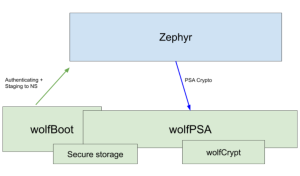
With the latest wolfBoot TrustZone work and the public release of wolfPSA, you can now replace the classic “TF-M + MCUboot” stack in Zephyr-based TrustZone designs with a tighter, wolfSSL-native alternative:
- wolfBoot becomes the secure domain and secure boot / firmware update authority.
- wolfPSA provides a PSA Crypto API implementation in the secure world.
- Zephyr (non-secure) calls into secure services through non-secure callable (NSC) veneers, using a PSA-friendly interface.
The result: a Zephyr TrustZone build where the secure domain is powered by wolfBoot and wolfPSA, and the non-secure side can use PSA-compliant crypto services without TF-M.
TrustZone-M in a nutshell
On reset, a TrustZone-enabled Cortex-M starts in its secure state. The secure firmware performs the bring-up, secure setup and staging:
- Partition memory and peripherals
The secure firmware configures the system’s attribution and access controls (for example, via SAU/IDAU rules and related platform security configuration). This defines which Flash/RAM regions are secure vs non-secure, and which peripherals are accessible from each world. - Define the secure gateway boundary (NSC)
Secure code exposes a carefully controlled set of entry points to the non-secure world using non-secure callable (NSC) functions. These are typically implemented as “veneer” functions placed in an NSC region and marked as callable from non-secure state. - Hand off to non-secure firmware
Once isolation is configured and the secure world is ready, secure code transfers control to the non-secure reset vector and the non-secure RTOS/application begins executing.
Typical Flash partitioning
While exact layouts differ by MCU family, a common TrustZone partitioning pattern looks like this:
- Secure Flash
- Secure boot / secure domain image
- Secure services (crypto, storage, attestation, policy)
- Secure metadata / keystore / rollback protection
- NSC region (the small “gateway” area callable from non-secure)
- Non-secure Flash
- Zephyr kernel image (non-secure)
- Application image(s)
- Non-secure update slots (depending on the update strategy)
RAM is commonly partitioned in a similar way: secure RAM for sensitive state and key material, non-secure RAM for the OS and applications, and sometimes a small shared region for messaging.
This is why TrustZone-M is so attractive for IoT and embedded devices: you get hardware isolation without needing a heavyweight architecture.
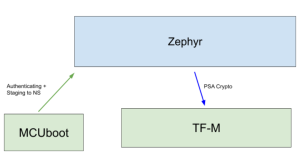
The classic Zephyr TrustZone stack: TF-M + MCUboot
In many upstream Zephyr TrustZone configurations, the roles are commonly filled by:
- Trusted Firmware-M (TF-M) in the secure world:
- Provides PSA-style secure services (PSA Crypto, storage, attestation, etc.)
- Supplies the secure partition that configures isolation and exposes an interface to non-secure callers.
- MCUboot as the bootloader / update mechanism:
- Performs verified boot of one or more images
- Supports firmware update flows
This stack is included in zephyr as default TEE build, but it also means multiple moving parts (bootloader + secure firmware + secure services libraries), multiple configuration domains, and often duplicated crypto plumbing across components.
A new option: wolfBoot Secure Domain + wolfPSA
wolfBoot has long been used as a portable secure bootloader and firmware update mechanism (secure boot, signed firmware authentication, anti-rollback patterns, multi-slot partitioning). With the latest TrustZone work, wolfBoot expands into its wider role of secure domain supervisor.
wolfBoot as the secure domain supervisor
When configured for TrustZone-M targets, wolfBoot can act as the secure world resident responsible for:
- Establishing the secure/non-secure partitioning
- Hosting secure services
- Exposing a narrow set of NSC veneers for non-secure callers
- Remaining the authority for verified boot and trusted firmware updates
This matters for Zephyr-based products because it enables an architecture where Zephyr stays in the non-secure domain, while wolfBoot owns the secure domain and the update chain of trust.
wolfPSA: PSA Crypto API in the secure world
wolfPSA is a PSA Crypto implementation built on top of wolfCrypt. In this TrustZone design:
- wolfPSA runs in the secure world, linked into the wolfBoot secure domain build.
- Non-secure Zephyr code can use PSA-style cryptography services without handling private keys directly.
- Sensitive operations (key generation, key import, signing, decryption, KDFs, MACs, etc.) can be performed inside the secure domain.
The PSA model assumes keys can be managed via persistent identifiers and protected storage semantics. In wolfBoot’s TrustZone configuration, the PSA storage side can be backed by the same secure Flash keystore concepts already used for other secure interfaces—keeping secrets anchored in secure Flash and never exposed to non-secure memory.
One secure boundary, multiple secure APIs
wolfBoot’s TrustZone support already allowed non-secure applications to call into secure crypto via a standard interface (for example, PKCS#11-style use cases). With this new work, wolfBoot can be configured to provide PSA Crypto services instead—giving you a more “RTOS-native” developer experience in Zephyr projects that already know PSA concepts.
Zephyr support: integrated into the west build workflow
wolfBoot now includes Zephyr integration components designed to fit into how Zephyr developers actually work:
- A Zephyr module wrapper (so the wolfBoot integration pieces can be consumed by Zephyr)
- Headers and glue code that align Zephyr’s PSA expectations with wolfBoot’s secure-call veneers
- A set of Zephyr patches that:
- add a wolfBoot-backed TEE driver hook
- add devicetree binding support needed for the integration
- provide a sample showcasing PSA Crypto calls routed into the secure world
- include board support updates for a TrustZone-capable target (for example an STM32H5 non-secure board variant)
- add Kconfig options to select the wolfBoot-backed secure services path
From a developer and CI standpoint, the goal is straightforward: keep Zephyr building the non-secure image with west build, while the secure world is provided by wolfBoot (and wolfPSA) in a way that cleanly snaps into the Zephyr project layout.
Why this matters: a Secure TrustZone stack you can trust, certify, support, and safely ship
Replacing a multi-component TrustZone stack with wolfBoot + wolfPSA is not just a technical preference — it’s often a product decision driven by certification, compliance, and long-term maintainability. If you’re building Zephyr-based devices on Cortex-M23/M33/M35 with TrustZone-M, switching to wolfSSL components brings several concrete advantages:
- FIPS 140-3 certified cryptography (wolfCrypt)
wolfPSA is built on wolfCrypt, giving you a clear path to deploying PSA Crypto services backed by a FIPS 140-3 certified cryptographic module. This is a major differentiator for regulated markets and procurement requirements where “validated crypto” is non-negotiable. - Professional engineering with supply chain readiness (CRA, SBOM, secure maintenance)
wolfSSL products are written and maintained by a dedicated team of professionals with a strong focus on secure development practices, long-term maintenance, and production-grade release processes. This aligns well with modern regulatory expectations around SBOM, vulnerability handling, and software supply chain obligations such as those emphasized by the Cyber Resilience Act and similar frameworks. - Safety certification support for regulated industries
wolfBoot has a track record of deployments in industries with strict safety requirements, and it has been certified for use in multiple safety-regulated contexts. For teams targeting industrial, medical, automotive, or other safety-conscious markets, this can significantly reduce risk and effort compared to assembling and qualifying a stack from loosely coupled components. - Dual licensing: GPLv3 or commercial
wolfSSL products are dual licensed, allowing you to choose GPLv3 for open-source compliance models or a commercial license for proprietary products, closed distributions, or streamlined legal and compliance requirements. - Support that matches product realities (up to 24/7)
When your secure boot chain, update mechanism, and secure-world crypto are part of your product’s root of trust, support isn’t optional. wolfSSL offers professional support options up to 24/7, helping teams accelerate bring-up, debug secure-world integration issues, and maintain security posture across product lifecycles.
Together, these differentiators turn TrustZone from a “feature you enable” into a security architecture you can confidently certify, maintain, and support in production — while keeping Zephyr fast and flexible in the non-secure domain and anchoring secrets and cryptographic operations inside the secure world.
Demo: PSA Crypto from Zephyr on Nucleo-STM32H563ZI, backed by wolfBoot + wolfPSA in TrustZone-M
To make the integration easy to try, the wolfBoot TrustZone work includes a complete demo showing Zephyr (non-secure) calling PSA Crypto APIs that are executed in the secure world by wolfBoot + wolfPSA, via the wolfBoot-backed TEE path.
The demo has two artifacts you build separately:
- wolfBoot as the secure domain, hosting wolfPSA and exporting the non-secure callable (NSC) veneers.
- Zephyr as the non-secure RTOS image, patched to route PSA calls into wolfBoot’s secure services.
- Apply the Zephyr patches shipped with wolfBoot
The wolfBoot tree provides a set of Zephyr patches required for this demo. Apply them to your Zephyr workspace using the workflow described in the Zephyr integration README included with the branch.Among other integration changes, one of these patches enables an ns build type for the Nucleo STM32H563ZI board. This is the board used to validate the port, and it allows Zephyr to be built explicitly as a non-secure image by selecting:-b nucleo_h563zi/stm32h563xx/ns
- Build wolfBoot as the secure domain with PSA enabled
Build wolfBoot separately as the secure world image, enabling PSA secure services by setting:WOLFBOOT_TZ_PSA=1
in wolfBoot’s .config.
This selects the TrustZone PSA configuration, links wolfPSA into the secure domain, and enables the PSA dispatch layer and NSC veneer surface that Zephyr will call. - Build and run the Zephyr PSA Crypto example using the wolfBoot module
One of the Zephyr patches adds a PSA Crypto example application intended to run with the wolfBoot-backed TEE integration. Build that sample as a non-secure Zephyr image and point Zephyr to the wolfBoot module path using ZEPHYR_EXTRA_MODULES.The full command used for the demo is:west build -b nucleo_h563zi/stm32h563xx/ns samples/wolfboot_integration/psa_crypto -- -DZEPHYR_EXTRA_MODULES=/path/to/wolfboot
This produces a non-secure Zephyr application that issues PSA Crypto calls, which are then forwarded through the secure-call boundary into the wolfBoot secure domain where wolfPSA performs the actual cryptographic operations.
Zephyr + TrustZone, with a path to FIPS-focused deployments
For TrustZone-enabled Cortex-M devices running Zephyr, wolfBoot + wolfPSA offers a practical new security architecture:
- Zephyr remains in the non-secure domain where it shines.
- wolfBoot becomes the secure domain and secure boot/update authority.
- wolfPSA delivers a PSA Crypto API implementation inside the secure world, reachable through NSC veneers.
This separation is also interesting for compliance-driven products. By offloading cryptographic operations to the secure world—and by building that secure world on wolfSSL’s proven cryptography stack—teams can design systems where the crypto boundary is tightly controlled. In the right configurations, this architecture can support a path toward certified FIPS 140-3 operating environments, with Zephyr in non-secure and cryptographic services anchored and enforced inside the TrustZone secure domain.
If you’re building a TrustZone-M product on Zephyr and want to simplify your secure boot + secure services stack (or explore PSA Crypto, secure storage, and compliance-oriented designs), get in touch with us at facts@wolfssl.com. We’re happy to help you evaluate the best configuration for your MCU, update strategy, and security requirements.
If you have questions about any of the above, please contact us at facts@wolfssl.com or call us at +1 425 245 8247.
Download wolfSSL Now